
A review companion for immigration representatives
Built by a practising RCIC.
SnapEE reads your client's Express Entry and permanent residence files in the IRCC portals, flags what needs attention, and builds a clear review report for your client to approve.
Client data never leaves your browser. Your client sees the portal's exact wording, not an AI summary.
Start a free 30-day trial Try the sample
- Encrypted on your computer
- Client data stays with you
- Never edits the portal
Works in Google Chrome, Microsoft Edge, Brave, Vivaldi and Opera, installed from the Chrome Web Store. Not supported in Firefox, Safari, or browsers on phones and tablets.
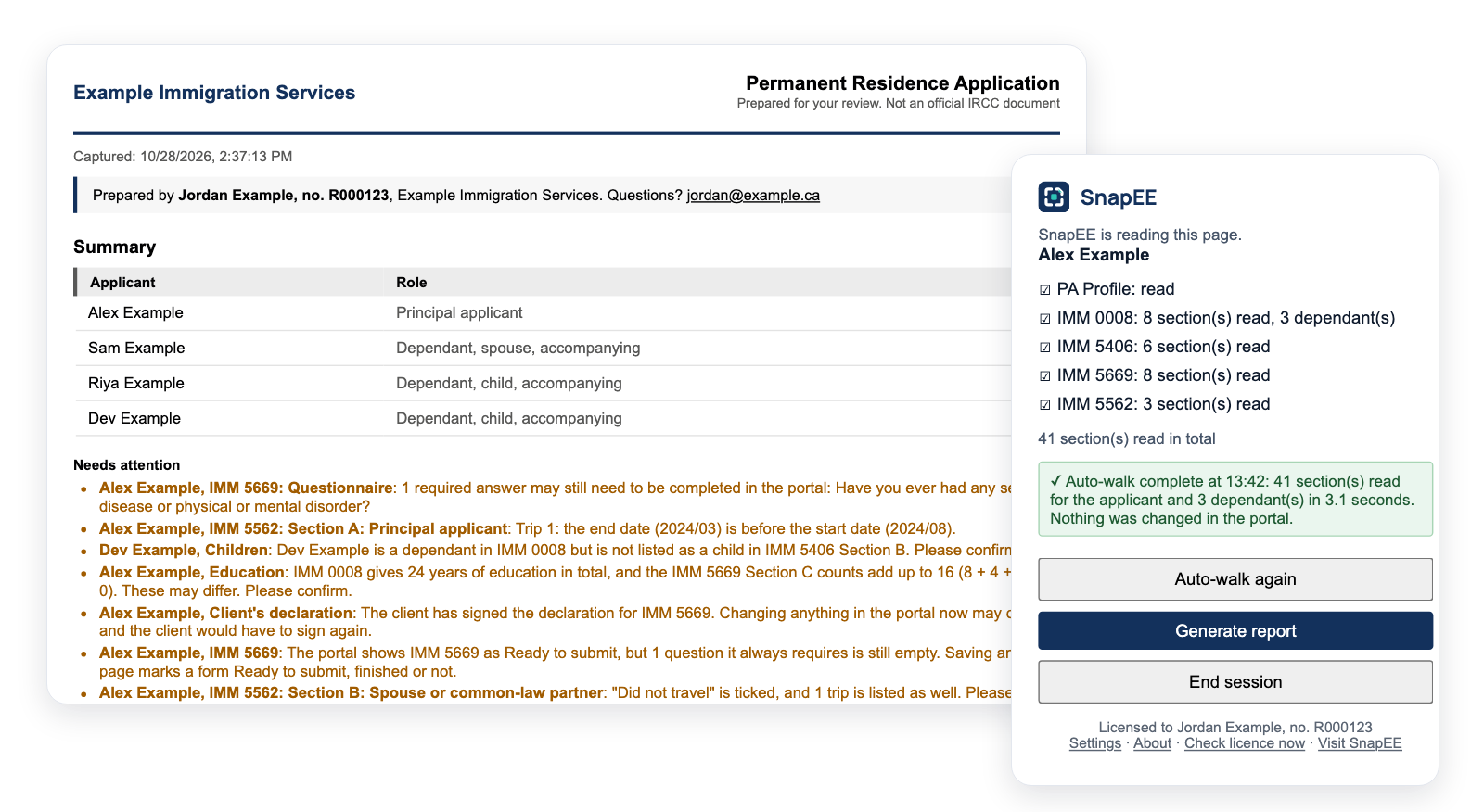
The firm, people and data shown are invented.
What SnapEE does
Reads the portal as you work
In the APR portal, SnapEE saves each section as you open it, or Auto-walk opens them for you. In the Permanent Residence Portal, Auto-walk reads the whole application, every form and every dependant, in seconds without opening a page. PR card and PR travel document applications get a day count for the residency obligation. SnapEE never changes anything in a portal.
Flags what needs attention
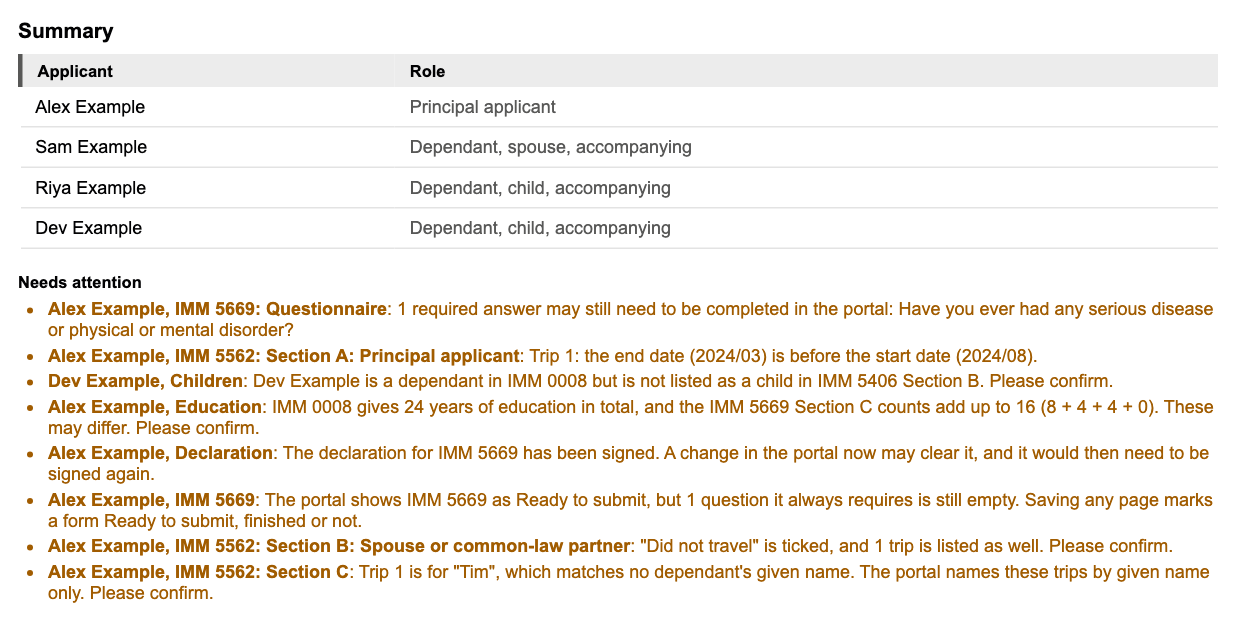
Required answers left empty, dates out of order, gaps in history, answers that differ between forms, documents not uploaded and a declaration already signed are listed on the first page of the report, so you can raise them before anything is submitted.
Review before you share
Optional, and off unless you turn it on in Settings. With it on, each report opens as a draft. You tick each flagged item once you have reviewed it, confirm you reviewed the report for accuracy, and the final PDF says who reviewed it and when.
Builds a report for approval
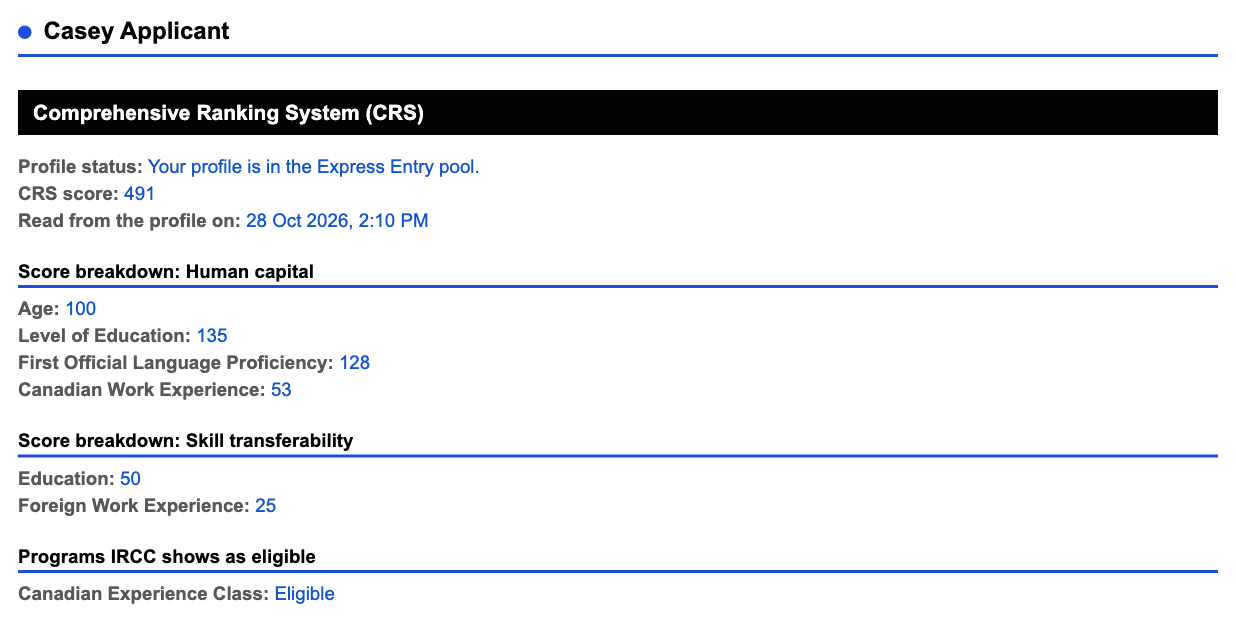
A PDF in your firm's name, with approval statements for your clients, the current CRS score and what each person has uploaded, without screenshots. Try it on a made-up file.
Give DIY clients a branded copy
An annual pass includes 5 review keys, and a firm plan includes 10 or 25. A DIY client uses SnapEE in your name and colours on their own IRCC account, checks every answer in one report, and the report offers your booking link. How review keys work.
One account for your firm
Set the branding once and every representative's reports and browsers use it. The owner manages billing and review keys at key.snapee.ca/account and signs in with a code sent by email, with no password. Firm of 2 or Firm of 5, from CA$99 a year. Firms and teams.
Built around client confidentiality
Your clients trust you with their file. SnapEE is designed so that their information stays with you.
Encrypted on your computer
What SnapEE reads from the portal is encrypted with AES-256 before it is saved in your own browser.
Never sent to us
There is no upload step. SnapEE builds the report on your computer. Only licence checks reach our licence server. They carry your licence key, a random install ID, a short browser label and your platform name. Like any web request, they also carry your browser's user agent, which we do not use, and your IP address, which we use only to stop repeated attempts, such as someone guessing licence keys.
Asks before it connects
Nothing contacts our licence server until you agree to the Before you start notice.
Reads only
SnapEE works only on IRCC application pages. It never changes, fills in or submits anything in the portal.
You can clear everything SnapEE has captured, or end a session, at any time. Encryption protects saved data from casual reading and loose copies. It is not a substitute for keeping your computer secure.
AI is fast. Your duty of confidentiality still applies.
Using an AI assistant to turn a client's portal file into a review report? Ask who else gets to see it.
| SnapEE | Cloud AI assistant | |
|---|---|---|
| Where client data goes | Nowhere. It stays in your browser, encrypted | To a third party's servers |
| Client consent | No client data goes to a third party | Sharing with an AI provider may need your client's informed consent |
| What your client approves | The portal's exact wording | An AI summary that can reword or miss details |
Your obligations depend on your regulator's code and privacy law. SnapEE is built so client data never leaves your computer. More about the difference
How it works
- Install and activate. Go to snapee.ca/install in Chrome, Edge, Brave, Vivaldi or Opera, add the extension, and enter the licence key from your trial email.
- Open your client's file. SnapEE saves each section as you open it, or Auto-walk reads the file for you, in the APR portal or the Permanent Residence Portal.
- Generate the report. Review it, add your comments, and send it to your client for approval. A review step before sharing is optional, and off unless you turn it on in Settings.
Simple pricing
CA$69 per year plus applicable taxes, after a free 30-day trial. One licence for one representative, on up to 3 browsers or devices. Firm plans for 2 or 5 representatives are CA$99 and CA$199 per year.
Questions
Who is SnapEE for?
Authorized immigration representatives: RCICs, lawyers and Quebec notaries who prepare Express Entry profiles and applications in the APR portal, and permanent residence applications in the Permanent Residence Portal, such as family class and Provincial Nominee Program applications.
Does it work in the Permanent Residence Portal?
Yes, and in the Representative Permanent Residence Portal too. SnapEE reads the PA Profile, IMM 0008 with every dependant, IMM 5406 and IMM 5669 for each adult, and IMM 5562. Auto-walk reads the whole application without opening pages, so nothing is marked complete. See Read an application in the Permanent Residence Portal.
Is it immigration advice?
No. SnapEE is a tool for reviewing what the portal shows. It does not provide immigration advice or represent anyone, and you are responsible for what you share with your client.
What do I need to start?
A Chromium-based browser such as Google Chrome, Microsoft Edge, Brave, Opera and Vivaldi, the SnapEE extension from the Chrome Web Store, and a trial key, which is sent by email after you request it.
Why use SnapEE instead of an AI assistant?
Cloud AI assistants send the page to a third party's servers and write their own summary, and sharing client information that way may need your client's consent. SnapEE reads the portal in your browser, sends no client data anywhere, and copies every field in the portal's exact wording. It only reads, so nothing in the portal can be changed. More about the difference.
Can I cancel?
Yes. Your pass runs until its end date. See how to cancel and the refund policy for details.
More in known limits.