
Help / Your licence
Review keys
A review key gives a DIY client a copy of SnapEE in your branding, which they use on their own IRCC account to check their application in one report before they submit. Review keys are optional, and SnapEE works the same whether or not you issue any.
Open your account page
Go to key.snapee.ca/account, or choose Settings, then Manage account, in the SnapEE popup. From a browser set up with your licence for at least a day, the page opens signed in. Otherwise, enter your email address and the 6-digit code we email you. See Manage account.
What your clients see
- Your account's branding: the company name (or the name your clients see, if you set one), the accent colour and the logo.
- Your booking link, offered in the report so the client can book a consultation with you.
- A report that speaks to them: it opens with "Courtesy of" your firm's name, has their own notes and questions, no approval block, and a line that the report is not immigration advice. SnapEE is named only at the bottom, as on your own reports.
The owner sets the name your clients see and the booking link at the bottom of the Review keys card, under What your clients see. An example there shows how a review key report reads as you type. Use your firm's name on its own, such as a trade name, since it is placed inside sentences.
Review keys are made for Express Entry profiles and applications in the client's own IRCC account. The Permanent Residence Portal has not been tested with a client's own account yet.
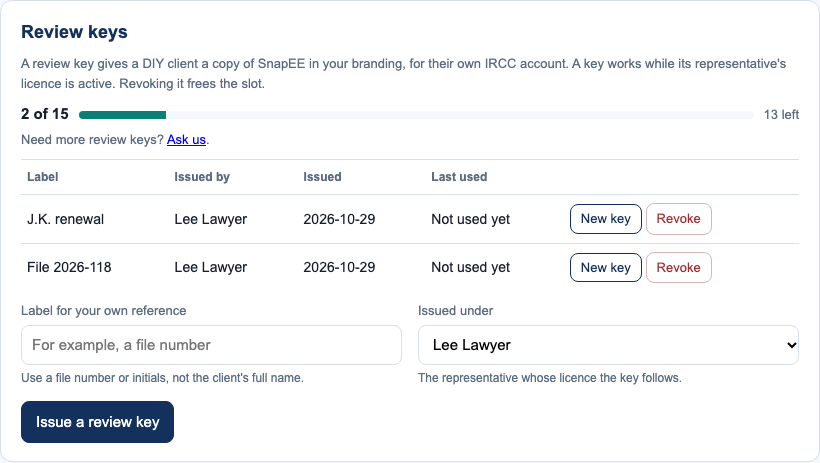
Issue and manage keys
- Keys come from one pool for the whole account. Solo includes 5 active keys, Firm of 2 includes 10 and Firm of 5 includes 25. A trial includes 1, and a firm trial includes 5. The owner can add packs of 10 more keys, at CA$29 per pack per year. On a Custom plan, the pool is agreed with us.
- The owner and each representative can issue keys while the pool has room. A representative sees the keys they issued. The owner sees every key and can move one to another representative; it keeps working for the client.
- A key is shown once, when you issue it. Send it to your client with the install link snapee.ca/install.
- Each key has a label so you can tell them apart. Use a file number or initials rather than the client's full name: labels are stored by SnapEE, though only your account page shows them.
- A review key works while the licence of the representative who issued it is active.
- You can revoke a key at any time, which frees its place for another client.
- If a client loses their key, choose New key. It is shown once, and the old one stops working.
See also Firms and teams and Buy, renew or cancel.
Still stuck? Write to support@snapee.ca.